Dynamic Code Statistics

Whats a line without a hook?

Lines of Code Files Code Lines

Quick Install

Terminal
$ npm install -g linehook
$ linehook init
LineHook Setup ================================================== How do you want LineHook to work? [1] Offline Mode (Manual Updates) - Generate badges locally - Commit and push to your repo [2] Auto Mode (GitHub Actions) - Badges auto-update on every push - Runs on GitHub's servers (free) [OK] LineHook initialized successfully!

How It Works

1

Analyze

LineHook scans your codebase and counts lines, files, languages, and assets.

$ linehook stats
2

Generate

Create beautiful SVG badges and graphs with 12+ themes.

$ linehook badge --save
3

Display

Add to your README, website, or anywhere that supports images.

![Lines](https://raw.githubusercontent.com/user/repo/main/.linehook/badges/lines.svg)

Live Example

These stats are from the LineHook repository itself, updated automatically on every push.
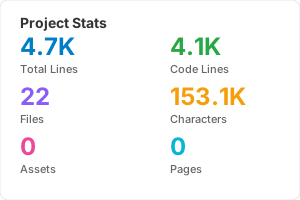
LineHook Stats Card

Individual Badges

Lines lines.svg
Code code.svg
Files files.svg
Characters chars.svg

Update Modes

Choose how you want your stats to update

Offline Mode

Manual Updates

Generate badges locally and commit them to your repo. Perfect for full control.

$ linehook init --offline
$ linehook badge --save
$ git add . && git commit -m "Update stats"
  • No server needed
  • Works forever
  • Full control

Website Integration

LineHook works anywhere - README, websites, dashboards

README.md
<!-- In your README.md --> ![Lines of Code](https://raw.githubusercontent.com/NagusameCS/lineHook/main/.linehook/badges/lines.svg) ![Files](https://raw.githubusercontent.com/NagusameCS/lineHook/main/.linehook/badges/files.svg) <!-- Stats Card --> ![Stats](https://raw.githubusercontent.com/NagusameCS/lineHook/main/.linehook/stats-card.svg)
index.html
<!-- Direct image embed --> <img src="https://raw.githubusercontent.com/NagusameCS/lineHook/main/.linehook/badges/lines.svg" alt="Lines of Code"> <img src="https://raw.githubusercontent.com/NagusameCS/lineHook/main/.linehook/badges/files.svg" alt="Files"> <!-- With link --> <a href="https://github.com/user/repo"> <img src="https://raw.githubusercontent.com/NagusameCS/lineHook/main/.linehook/badges/lines.svg" alt="Lines"> </a>
embed.html
<!-- LineHook Widget (auto-sizing) --> <div class="linehook-stats"> <object data="https://raw.githubusercontent.com/NagusameCS/lineHook/main/.linehook/stats-card.svg" type="image/svg+xml"></object> </div> <!-- Inline SVG (best for styling) --> <div id="stats-container"></div> <script> fetch('https://raw.githubusercontent.com/NagusameCS/lineHook/main/.linehook/stats-card.svg') .then(r => r.text()) .then(svg => document.getElementById('stats-container').innerHTML = svg); </script>

Webhook Integration

Real-time updates via webhooks for advanced use cases

Development Server

Start a local server for real-time badge generation during development.

$ linehook webhook --serve
[OK] Server running on http://localhost:3456 Endpoints: GET /stats JSON stats GET /badge/lines Lines badge GET /graph/summary Stats card POST /webhook GitHub webhook

GitHub Webhook

Configure GitHub to notify your server on every push for truly live stats.

$ linehook webhook --setup
Configure in GitHub: Settings > Webhooks > Add webhook Payload URL: https://your-server.com/webhook Content type: application/json Events: Push events

12+ Beautiful Themes

Match your project's style with built-in themes

default
dracula
nord
tokyoNight
catppuccin
monokai
neon
ocean
$ linehook badge --theme dracula --save
$ linehook graph --theme nord -o stats.svg

Commands Reference

linehook stats

Analyze project and display statistics

$ linehook stats --dir ./src
$ linehook stats --output json

linehook badge

Generate badge SVGs for your README

$ linehook badge --type all --save
$ linehook badge --theme dracula --svg

linehook graph

Generate visual charts and cards

$ linehook graph --type summary -o stats.svg
$ linehook graph --type pie -o langs.svg

linehook init

Initialize LineHook in your project

$ linehook init --auto
$ linehook init --offline

linehook webhook

Start webhook server for real-time stats

$ linehook webhook --serve
$ linehook webhook --port 8080

linehook theme

Preview and manage color themes

$ linehook theme --list
$ linehook theme --preview dracula

Frequently Asked Questions

Will badges break if my computer turns off?

No! LineHook generates static SVG files stored in your repository. They're just regular files - they work as long as your repo exists. Neither Offline Mode nor Auto Mode requires your computer to be on.

What's the difference between Offline and Auto mode?

Offline Mode: You manually run linehook badge --save and commit the files. Auto Mode: GitHub Actions automatically regenerates badges on every push. Both create static files - the only difference is who triggers the update.

Do I need to pay for anything?

No! LineHook is completely free. GitHub Actions is free for public repos and has generous free tier for private repos.

Can I use this on websites, not just READMEs?

Yes! The generated SVG files work anywhere - HTML websites, documentation sites, dashboards. Just use an <img> tag or embed the SVG inline.

How do I get truly real-time badges?

For real-time badges (updating on every page view), you'll need a hosted service. Run linehook webhook --serve on a server like Vercel, Render, or Railway. The webhook endpoint returns fresh stats on every request.

